
I tested Softr myself by building an AI-powered app from scratch to see how it actually performs. Once you move past the surface, questions start to come up around its real capabilities, flexibility, and whether the AI truly saves time.
This Softr AI review breaks everything down from a practical builder’s perspective. I’ll walk you through what worked, what didn’t, and how it fits into real workflows. So you can decide if Softr is the right tool for your business or not.
Test Softr – Our Review on Ease of use
We tested Softr in real conditions on several client projects, and it’s one of the most intuitive AI app builders we’ve used. The onboarding lets you start from scratch, use a template (with sample data for CRMs, client portals, directories, and more), or generate an app with AI. From there, the drag-and-drop editor lets you customize pre-built blocks—Lists, Details, Forms, Tables, Charts—without technical knowledge.
What impressed us most is how easy the interface is to navigate. The Interface, Data, Users, and Workflows are all accessible from the top bar, while pages, themes, and settings are managed from the left navigation. We built a functional client portal with lead tracking and meeting scheduling in 20 minutes flat. The AI generation feature creates apps from text prompts in seconds—we tested it with “CRM for consulting agency” and got 80% of what we needed immediately.
Even better, the learning curve is minimal. We trained a non-technical client in under an hour—they were editing pages and managing users independently afterward. Conditional visibility rules (show/hide blocks based on user roles) work without code through simple dropdown menus. Real-time data sync with Airtable, Notion, HubSpot, and 15+ other data sources means changes in these systems appear instantly in your apps without manual refresh.
Advanced customizations are available through custom code blocks, but in most cases you won’t need them. While Softr’s builder prioritizes speed over pixel-level control, the new vibe coding block makes it possible to generate custom UI components (that safely connect to your data) and tools from a prompt when you need more flexibility.
➕ Pros / ➖ Cons
✅ Ultra-fast setup, minimal learning curve (launch in minutes)
✅ AI-powered generation (generate apps and blocks from prompts)
✅ Easy for non-technical users (no code required)
✅ Built-in databases and workflows (plus real-time sync with 15+ external data sources)
❌ Advanced settings can be harder to find (custom CSS, APIs)
❌ Templates require customization (good start but need tweaking)
❌ Pixel-level design control limited(prioritizes speed over precision)
Test Softr – Our Review on Value for money
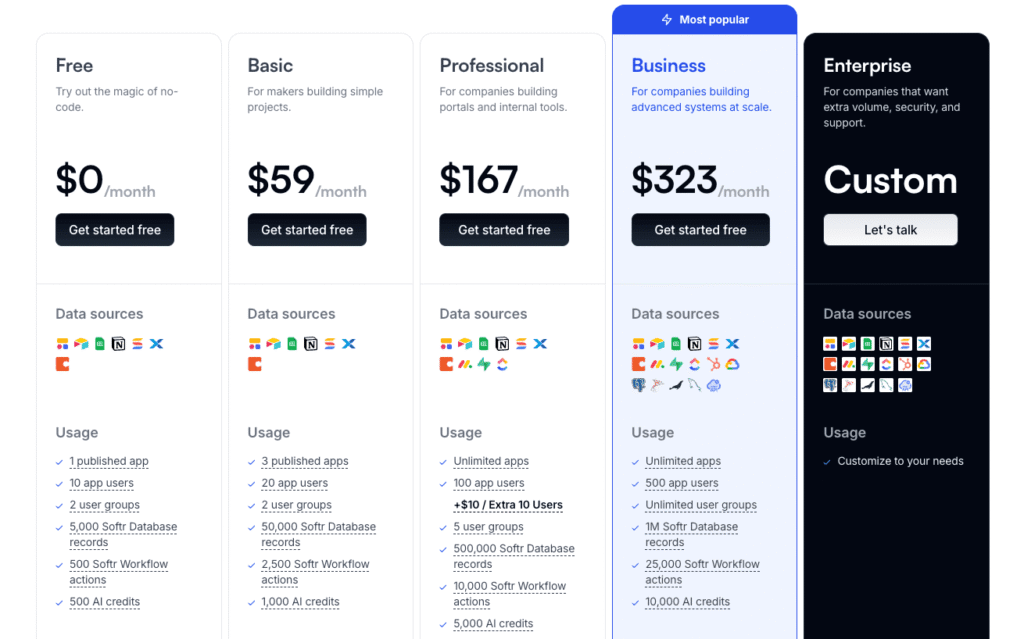
Softr’s pricing is flat and transparent, without traditional per-seat pricing. The Free plan is generous for testing—1 published app with 10 users, AI credits, and access to the core building blocks. We used it to validate a client portal concept before committing to paid.
Basic at $49/month (paid annually) allows you to add custom code blocks and ups limits to 20 app users. For real client work, you’ll likely need a Professional plan at $139/month (billed annually), which supports growing teams with higher user and workflow limits, or Business at $269/month, designed for larger apps with significantly higher usage thresholds. The Business plan is marked “most popular” for a reason—agencies and companies quickly hit Professional limits when managing multiple client projects.
Softr is often a better value than Airtable for app use cases because it avoids per-seat pricing models, and sits similarly to Bubble ($29-$349), but with more flexibility and much lower learning curve. The value depends on your use case—if you need production-ready business apps with logins, permissions, and workflows, the pricing is justified.
For freelancers and small teams, Professional at $139/month is the sweet spot. For agencies managing 10+ client apps, Business at $269/month becomes necessary.
➕ Pros / ➖ Cons
✅ Generous free plan(1 app with up to 10 users)
✅ Flat, transparent pricing (no per-seat fees or hidden costs)
✅ All core features included (apps, databases, workflows, forms)
✅ Remove Softr branding (on Pro plan and above)
❌ Need a custom plan for more than 500 users
❌ Advanced data sources on higher tiers(SQL and REST API access require upgrades)
❌ Costs add up for agencies (multiple client projects push to Business)
Test Softr – Our Review on Features and depth
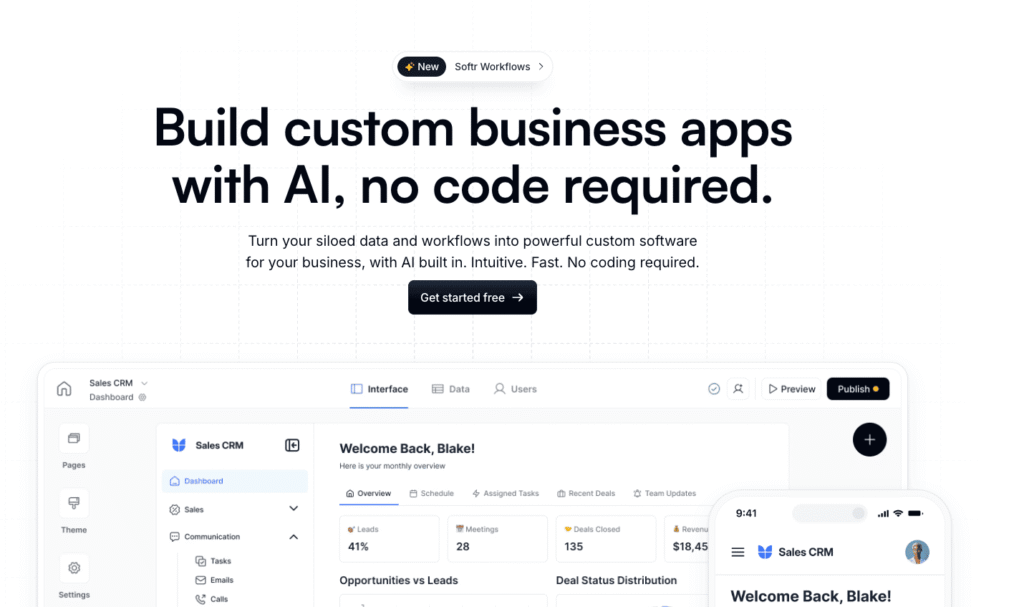
Softr’s feature set has grown remarkably, and it’s now a full-stack AI platform where you can build databases, apps, workflows, and forms to power internal tools, portals, and full operational systems without writing code. We built a full CRM with lead tracking, a meeting scheduler synced to Google Calendar, deal pipelines with status updates, and revenue dashboards pulling real-time Airtable data. All this in under 2 hours, without writing code.
User authentication is surprisingly robust. Softr handles sign-ups, logins, password resets, and role-based permissions natively. We set up a client portal with 3 user roles (Admin, Manager, Client) where each sees different data and pages—configured via dropdown menus, no code. Conditional visibility rules let you show or hide blocks based on user roles, logged-in status, or custom fields. This level of granularity rivals custom-coded solutions.
Softr Workflows automates actions directly inside your apps and databases without relying on tools like Zapier great for things like sending emails, updating records, and triggering notifications based on events. We tested it for lead assignment automation: when a new lead enters Airtable, Softr assigns it to the right sales rep and sends a Slack notification. For business automations, Softr Workflows works perfectly, includes an AI co-builder to get set up faster, and can replace basic Zapier workflows to save you around $29/month in automation costs.
What’s missing? Softr is primarily designed for CRUD-based business applications (Create, Read, Update, Delete). Building complex SaaS products with real-time collaboration or custom AI processing still requires external APIs or developer tools. But for 95% of business apps, Softr delivers everything needed out-of-the-box.
➕ Pros / ➖ Cons
✅ Robust user authentication (roles, permissions, conditional visibility)
✅ Modern, pre-built block library (forms, charts, lists, detail pages)
✅ Built-in databases(native data storage or real-time sync with external sources)
✅ Native workflow automation (visual builder, UI triggers)
❌ Not designed for complex SaaS products (best for internal tools and portals)
❌ May need Make or n8n (for heavy or complex workflows)
❌ CRUD-focused(real-time collaboration requires custom APIs)
Test Softr – Our Review on Customer support and education
Softr’s support is exceptionally strong by SaaS standards, and noticeably better than many platforms we’ve worked with—even on the free plan. Documentation is comprehensive, with 100+ articles, video tutorials, and real-world use case examples covering everything from basic setup to more advanced features like conditional visibility. The search works well, guides are clear and step-by-step with screenshots, and between documentation, community, and in-app chat support, it’s rare to get stuck without a clear path forward.
We contacted support for an issue with Airtable sync via email and received a clear response with a workable solution within the same day. When using in-app chat, responses were fast and the answers were technical and actionable rather than generic. That said, response speed can vary depending on the issue and timing, and some questions still require a follow-up.
The community forum is active with 1000+ threads. Softr team members (marked with badges) answer regularly, and power users share templates and solutions. We posted a question about conditional visibility and got 2 helpful replies within 6 hours.
Verdict: Support is a real strength of the platform. Between the documentation, community, and generally responsive support team, we didn’t feel blocked while working on client projects.
➕ Pros / ➖ Cons
✅ Fast in-app chat support (technical, actionable replies)
✅ Comprehensive documentation (100+ articles, videos, examples)
✅ Active community forum (quick peer answers, team involvement)
✅ Transparent roadmap (feature requests tracked publicly)
❌ Response times can vary (some issues need follow-ups)
❌ Non-enterprise training option could be helpful
❌ Some edge cases require patience(complex issues take longer)
Test Softr – Our Review on Available integrations

Softr’s integration strategy focuses on core database connections plus third-party middleware. You can build with Softr Databases or connect natively with 15+ data sources, including airtable, Notion, HubSpot, Google Sheets, and SQL databases—these work reliably with real-time, 2-way sync. We connected an Airtable base with 15 tables in 2 clicks, and all changes (new records, edits, deletions) appeared instantly in the Softr app.
For automation, Softr gives you the flexibility to build with its native workflows—which provide a clean visual builder with triggers and actions, plus AI-assisted setup—or set up workflows via make, Zapier And N8n. We set up five workflows via Make, including Stripe payment → create Airtable record, new lead → send Slack notification, and form submission → update Google Sheets.
Other third-party integrations include Weglot for multi-language apps, Stripe and PayPal for accepting payments, and Google Analytics. We tested the Stripe integration for a membership portal—payments processed smoothly with automatic user role updates. Compared to Bubble plugin ecosystem (500+ integrations), Softr’s catalog is smaller and sometimes requires manual API work, but all the core needs are met.
Verdict: excellent for standard business apps (CRMs, portals, internal tools). However, if you need more niche integrations (AI APIs, blockchain, IoT), be prepared for custom API development. For most SMBs and agencies, the available integrations are more than sufficient.
➕ Pros / ➖ Cons
✅ Real-time, 2-way sync with 15+ data sources (Airtable, HubSpot, Notion, and more)
✅ Make, n8n, and Zapier support(automation across apps and databases)
✅ Stripe native integration (easy payment processing)
✅ Custom API connections (REST API for advanced needs)
❌ Smaller native catalog (vs Bubble’s 500+ plugins)
❌ Niche integrations need API work (custom code required for edge cases)
❌ Some connectors on higher tiers(SQL/REST API require upgrades)
FAQ – EVERYTHING ABOUT SOFTR
Is Softr really free?
Yes, Softr offers a lifetime free plan with no credit card required. This plan includes published apps with up to 10 users and access to core features like user authentication and pre-built blocks. It’s ideal for testing the platform or building simple internal tools with limited users.
If you need custom domains, more users, or higher credit limits, you’ll need to upgrade to a paid plan such as Basic, Professional, or Business (pricing starts at $49/month, billed annually).
How much does Softr cost per month?
Softr pricing starts at $0/month for the Free plan (up to 10 users), then $49/month billed annually for Basic (25 users, custom domains), $139/month for Professional (50 users), and $269/month for Business (500 users). There’s also a custom Enterprise plan for larger organizations.
Costs depend on factors like the number of users, workflow usage, and AI credits. For most client work, the Professional plan is the sweet spot. Agencies managing multiple projects will likely need a Business plan.
Can you use Softr with databases other than Airtable?
Yes! Softr natively supports 15+ data sources, including Airtable, Notion, HubSpot, Google Sheets, SQL, and more—these work with real-time sync and full feature support. For other databases and tools (e.g. Asana, Shopify, Pipedrive), you can use REST API to connect your data to your apps. Softr also has its own native databases, which make it easy to manage your data and power your apps in one place, without relying on external tools.
How does Softr use AI?
Softr uses AI to speed up app creation, not to replace manual control. You can generate starter app structures, databases, workflows, or UI components from prompts, but still have full control of your data, permissions, and logic. In practice, we found AI most useful for getting the first 70–80% done quickly, especially for common use cases like CRMs or client portals.
Softr also includes Ask AI, a built-in chat assistant you can enable inside your apps to help users query data, understand records, or get answers from the system—useful for internal teams or client-facing portals without building custom search or logic.
Does Softr work for building complex SaaS applications?
Not really. Softr excels at portals, internal tools, knowledge bases, inventory trackers, ERPs, and CRMs, but it’s not designed for complex SaaS products or native mobile apps. If you’re building a SaaS product with custom backend logic, consider Bubble or custom code. But for custom business apps (dashboards, membership sites, booking systems), Softr delivers.
Does Softr require coding knowledge?
No—Softr is fully usable without coding for standard features. We’ve built functional client portals, CRMs, and directories without writing a single line of code—everything works through AI, drag-and-drop blocks, dropdown menus, and pre-built templates. However, advanced customizations like custom CSS styling, complex formulas, or external API integrations require some technical knowledge. We added custom CSS to match a client’s brand colors—it’s optional but helpful. If you want pixel-perfect design or advanced logic, basic HTML/CSS helps but isn’t mandatory.



Comment