
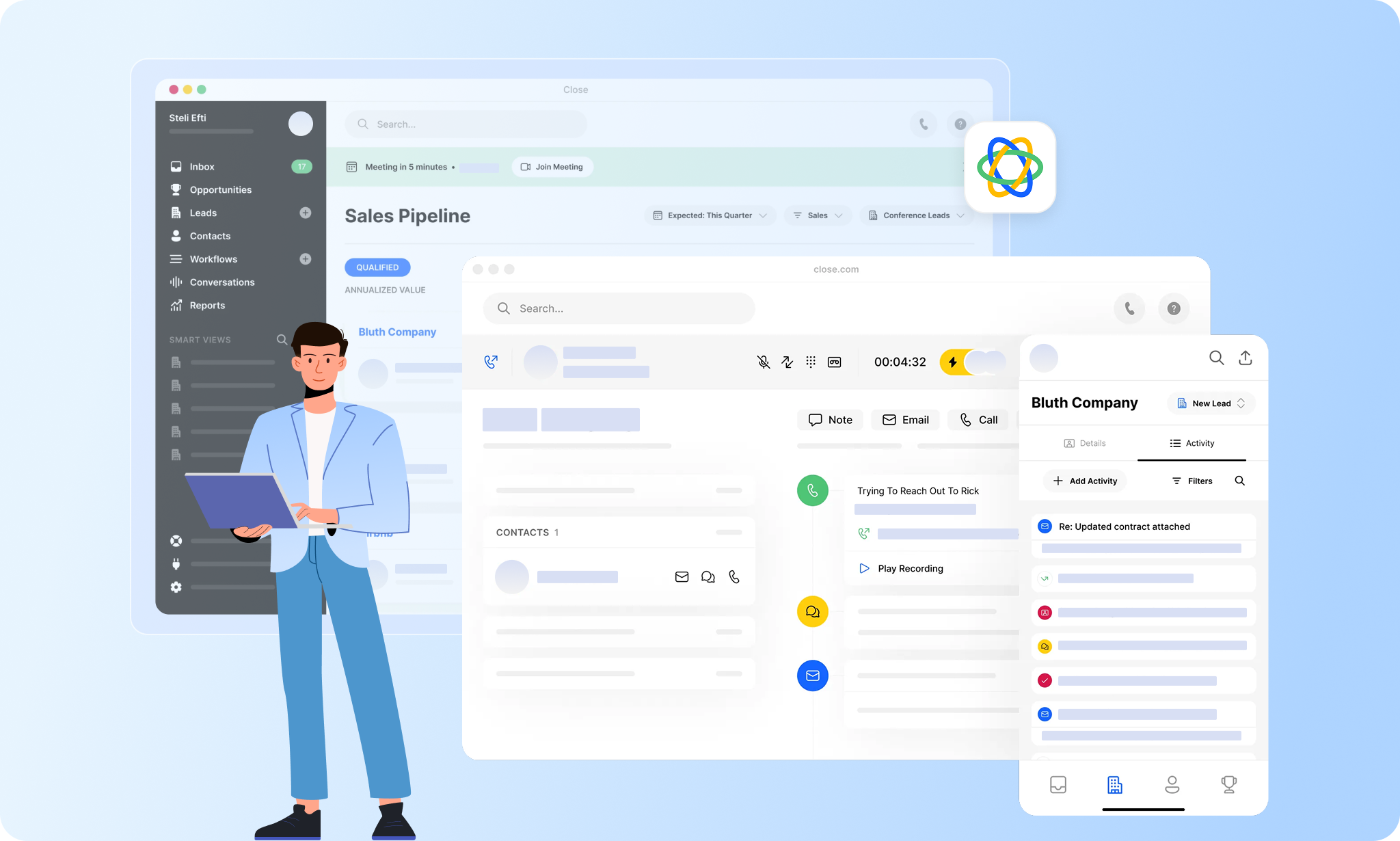
Choosing a CRM for B2B SaaS sales teams is no longer just about tracking deals but about supporting how sales teams execute work every day. As interest in a detailed close crm review continues to grow, many SaaS leaders are evaluating whether Close CRM fits their outbound-heavy workflows and fast sales cycles. Close positions itself as a sales-first CRM optimized for calling, outreach, and speed rather than cross-team coordination. This guide examines how Close CRM performs across features, pricing, usability, and scalability, while briefly acknowledging why some teams later explore broader execution platforms like Lark.
Close.io overview
Close software is a specialized CRM platform designed for small to medium-sized businesses, focusing on converting leads into revenue.
It integrates key sales functions like email, calling, and SMS into a single inbox, improved by robust sales automation and workflow tools. This makes it an efficient solution for sales enablement and tracking.
Close supports scalable sales activities with features like bulk email automation and advanced calling options.
Its comprehensive lead management system, coupled with an open API for easy integration with over 50 applications, makes Close a versatile tool for businesses that want to streamline their sales processes.
Who is Close for
Close has the following typical customers:
- Freelancers
- Mid Size Business
- Non-Profit
- Small Business
- Entreprises
Close’s features and functionalities
Free online demo (no sign up required) – Close CRM
1. Setup and migration
Close offers a quick setup process, including a CSV import tool for leads and contacts and a free, one-click migration tool for users switching from other CRMs.
2. All-in-one selling platform
The tool integrates email and calendar functionalities out of the box, along with built-in calling, SMS, and Zoom integration, enabling teams to reach quality leads with ease.
Close can be used on mobile and desktop apps.
3. Automated outreach
Close features Workflows and automated follow-up reminders to increase response rates without manual effort, helping users see ROI in a few weeks.
4. CRM and sales productivity tools
The platform is designed to help startups and small businesses close more deals faster, with tools tailored for sales productivity.
5. Integrations
Close offers a range of integrations to work seamlessly with any tool in your stack, enhancing its usability and adaptability.
Some integrations include:
HubSpot Marketing Hub, ActiveCampaign, QuotaPath, Spiff, Calendly, Clearbit, Zapier, Google Workspace, DocuSign, Airtable, Zoom Meetings, Gong.io, Drift, JustCall, Slack, Microsoft 365, Drip, Mailchimp, Clay, Asana, PandaDoc, SavvyCal, Google Sheets, Intercom, LeadFuze, Shopify.
6. Communication tools
Close CRM includes built-in communication tools that facilitate direct engagement with leads and customers through multiple channels.
These tools combine several communication channels into a single platform, eliminating the need for salespeople to switch between different apps.
Some of the key communication tools Close offers are:
- Two-Way Email Sync
Emails are automatically synced with Close, ensuring all communication with leads and customers is tracked and readily accessible within the CRM.
- Integrated Calling
It allows users to make calls directly from Close platform, eliminating the need for a separate phone system. Salespeople can keep track of call history and recordings within the CRM for better organization.
- SMS Text Messaging
All plans include the ability to send and receive SMS text messages directly through Close, providing another channel for communication with prospects and clients.
7. Sales automation
Close automates key sales tasks, reducing the manual workload and increasing efficiency.
These features include:
- Automated Workflows
Close allows you to create workflows that trigger specific actions based on predefined criteria.
Workflows can be used in automating communication steps, assigning leads to manage, and creating follow-up tasks.
- Automated Triggers
These work in conjunction with workflows and fire whenever a specific event occurs within Close. This could be something like a new lead being created, a lead’s email address being verified, or a lead taking a specific action on your website (e.g., a subscriber sends or replies to any email from a Connected Account in Close ).
- Predictive Dialer & Power Dialer
Close offers both predictive and power dialer functionalities to automate the dialing process for salespeople.
A predictive dialer connects reps with available leads as soon as possible, minimizing wait times. A power dialer allows reps to dial through a list of leads automatically, with the ability to pause and resume as needed.
- Automated Email Sequences
Create pre-written email sequences to be automatically sent to leads or customers based on specific triggers. This can save time and ensure consistent messaging throughout the sales process.
- Automated Data Entry
Close can automatically populate data fields in lead or contact records based on information from emails or other sources. This reduces manual data entry and helps to ensure data accuracy.
8. Reporting and analytics
Close platform provides reporting tools for quick KPI reports and training, enabling sales teams to track and analyze their performance effectively.
Close has several different reports based on the metrics that need to be tracked. It offers Sales Team Activity Tracking and Opportunity Tracking, as well as the function to export your report data. You can track and analyse:
- Activity Comparison in time-based reports
- Activity Overview based on priority metrics
- Status Change in the movement of your leads down the pipeline
- Sent Email data including open rates and response rates
- Opportunity Tracking
- Opportunity List
- Opportunity Funnels that show you how your opportunities perform in a given time
9. User-friendly interface
Close is praised for its simplicity and ease of use, ensuring full team engagement and quick onboarding.
10. Customer support and resources
Close offers robust customer support and resources, including a help center, API documentation, and product updates.
Close offers the following support options:
- Email/Help Desk
- Chat
- Knowledge Base
- Phone Support
- FAQs/Forum
11. Security
The platform emphasizes security, ensuring that user data is protected and managed responsibly.
Pricing
Plans
→ Free trial: 14 days ✅
→ Startup: $49/mo/1 user
- Store Leads, Contacts, and Opportunities
- 3 Workflows
- Email and calendar sync
- Zapier integration
- Power Dialer
→ Professional: $299/mo/3 users
Includes all Startup features, plus
- Increased Leads, Contacts, Custom Fields, and Email Templates
- Multiple Pipelines
- 25 Workflows
- Custom Activities
→ Enterprise: $699/mo/5 users
All Professional features, plus
- Custom Objects (Beta)
- 100 Workflows
- Call Coaching
- Predictive Dialer
Ratings, pros and cons
Ratings ⭐⭐⭐⭐⭐
G2 – 4.7/5 (1,044 reviews) | Capterra – 4.7/5 (160 reviews) ,
✅ Pros
- Integrated calling from the platform
- Two-way email sync
- Customizable reporting
- API for easy integration with other tools and services
- Offers a cost-effective solution compared to other CRMs
- Excellent customer support
- User-friendly interface
- Ideal for SaaS and sales agencies
- Extensive customization through a flexible API
- Improves management and workflow efficiency
❌ Cons
- Limited integrations
- The cost may be prohibitive for smaller teams or startups
- Users may find customization options less extensive than desired
- May not include certain advanced features found in enterprise-level CRM solutions
- Users have reported difficulties in effectively using HTML emails within Close.io
- Users find it hard to understand and utilize email analytics like open rates and campaign effectiveness
- Difficulty in tracking and understanding the costs associated with calls
- Inefficient workflows and automations
- Challenges in getting effective technical support, along with user experience issues like slowness and complexity.
- No free forever plan
- SMS messages only go to US, CA, GB, and AUS.
- SMS texts cost $0.01 per outgoing message.
Is Close good value for money?
✅ Close might be a good value for you if:
- You’re a small sales team or solopreneur: The Startup plan ($49/month/user) offers core CRM functionalities like lead and contact management with basic automation (3 workflows). This can be sufficient for a small team starting out.
- You want a clean interface: Close is known for its user-friendly design and intuitive interface, making it easy for teams to learn and adopt.
- You value multiple integrations: Close integrates with various tools like marketing automation platforms and email providers, streamlining workflows.
❌ Close is NOT good value if:
- You have a large sales team: The cost per user increases significantly with higher tiers. Explore options with per-team pricing for larger groups.
- You need highly customized features: Close offers some customization options but may not cater to very specific needs compared to more robust CRM systems.
- You’re on a very tight budget: There are free and open-source CRM options available, though they may lack some features and require more technical expertise to set up.
Here’s our suggestion: Take advantage of the 14-day free trial to test Close and see if it fits your needs and workflow.Most importantly, don’t forget to compare Close to other CRM options. Research features, pricing, and user reviews of similar platforms to find the best fit for your budget and requirements before you make a commitment.
Close vs lemlist
lemlist is hands-down the best alternative to Close.
While Close offers robust features, lemlist’s AI-driven personalization, lead generation efficiency, and email deliverability make it a more comprehensive choice for sales and marketing teams.
These strengths position lemlist as the only cold outreach tool that helps reach inboxes and get replies.
Why is lemlist often the preferred choice over Close?
- Lead database and enrichment
lemlist offers a massive (450 million+) sales lead database and enrichment feature, contrary to Close, enabling more precise and relevant outreach.
- Find and verify valid email addresses
lemlist offers an advanced email finder and verifier tool, built from testing over 40 email providers. What you get is a tool that nails 80% of valid emails using just the first name, last name, and company name.
- Free email warm-up
lemlist’s automated email warm-up helps build a stronger sender reputation, enhancing email deliverability more effectively. lemlist enhances email deliverability and engagement without additional costs, a unique offering not found in Close.
- Custom image & video variables
Unlike Close, lemlist allows customizing images and videos in emails at scale, making campaigns more engaging and increasing response rates.
- Automated follow-ups
lemlist ensures consistent and effortless communication with automated follow-ups, a step ahead of Close that offers solely reminders.
- A/B testing
With lemlist’s A/B testing capability, users can develop more refined and audience-specific messaging strategies, offering a more targeted approach than Close.
- In-app live support
lemlist provides immediate in-app support, ensuring users can efficiently utilize all features and minimize downtime, unlike Close, which offers only email support.
- AI-generated campaigns
AI to generate campaigns in lemlist leads to highly personalized and optimized outreach, setting it apart from Close regarding efficiency and conversion rates.
- Better price for greater value
lemlist offers better value for money.
lemlist’s starting plan starts from only €39 per month to compare with Close’s $59. Moreover, lemlist’s multichannel expert plans with advanced features is only $99 per month while Close’s pro plan costs $109.
Here’s lemlist pricing plans:
Need more to decide which one suits your needs better?
Here’s a full comparison table of lemlist vs Close:
Feature
lemlist
Close
B2B Lead Database
✅
❌
Email Finder and Verifier
✅
❌
Chrome extension
✅
✅
Email warm-up and deliverability booster
✅
❌
Custom text
✅
✅
Custom images
✅
❌
Custom videos
✅
❌
Multisender per campaign
✅
✅
Cold email templates
✅
✅
Advanced conditions in sequence
✅
❌
Automated follow-ups
✅
❌ (only reminders)
Task management
✅
✅
A/B testing
✅
❌
Campaign performance report
✅
✅
CRM integrations
✅
✅
Zapier
✅
✅
API
✅
✅
In-app live support
✅
❌
Free warmup and email booster
✅
❌
Icebreaker generated by AI
✅
❌
Campaign generated by AI
✅
❌
Unsubscribe link feature
✅
✅



Comment